
TL;DR: Good knowledge base design helps customers find answers with minimal effort through intuitive navigation, effective search, clear content organization, mobile-friendly layouts, and accessible experiences. A well-designed knowledge base improves self-service adoption, reduces support requests, and makes information easier to find and use.
A knowledge base can contain accurate, helpful information, but its value is limited if users cannot find what they need quickly.
Poor navigation, unclear content organization, and ineffective search can make even the best content difficult to use.
According to Gartner, 43% of self-service failures occur because customers cannot find content relevant to their issue.
This highlights the importance of discoverability and usability in knowledge base design. Fortunately, many of these challenges can be addressed through thoughtful design improvements and user-focused content organization.
By optimizing elements such as search, navigation, readability, accessibility, and visual presentation, organizations can make information easier to find, understand, and act on.
In this blog, we’ll explore practical techniques to improve your knowledge base design and create a more intuitive self-service experience.
Why knowledge base design matters
Well-designed knowledge base software does more than improve aesthetics. The following benefits highlight how thoughtful design can improve the user experience and support self-service adoption.
- Improves content discoverability: Clear navigation, intuitive categories, effective search, and scannable layouts help users find answers quickly.
- Enhances usability and accessibility: Well-structured pages, readable formatting, and accessible design practices make content easier for all users to navigate.
- Makes complex information easier to understand: Visual elements such as screenshots, diagrams, and videos can simplify complex topics, improve comprehension, and support information retention.
- Encourages self-service and reduces support effort: When customers can easily locate and understand information, they are more likely to resolve issues independently instead of contacting customer support teams.
- Strengthens brand consistency and trust: Knowledge base articles that align with your brand’s visual identity provide a consistent customer experience and reinforce its role as an official support resource.
Knowledge base design best practices
Even great knowledge base content won’t help if users can’t find it quickly, or if it’s hard to read once they do.
By refining key design elements, you can create a more intuitive and effective customer self-service experience.
Here are some of the most effective ways to improve your knowledge base design.
1. Make answers easier to find with the search option
Search is often the fastest path to an answer, so it should be the most prominent element in your knowledge base.
Place the search bar above the fold on the homepage and make it visible across category and article pages.
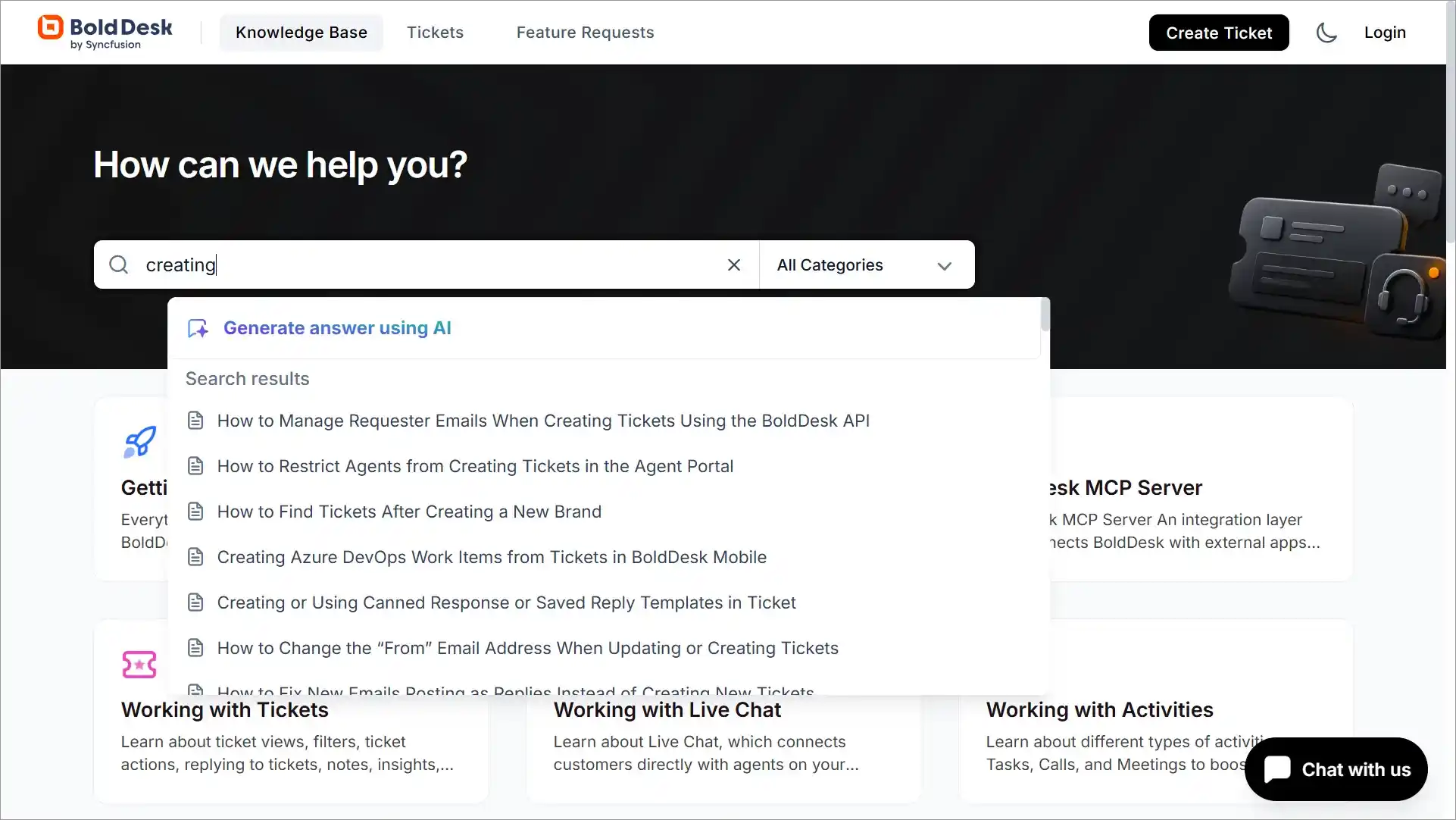
Use clear placeholder text such as “Search for articles, guides, or troubleshooting steps” to help users understand what they can search for.
You can also improve the experience by adding autocomplete suggestions and displaying relevant articles as users type.
2. Create clear category structures
While search helps users find answers directly, not everyone comes with a specific question in mind. Many users prefer to browse a knowledge base website before they search.
Organize content based on how customers look for information, not how your company is structured internally.
A well-planned knowledge base architecture helps create a logical structure that makes content easier to navigate and maintain.
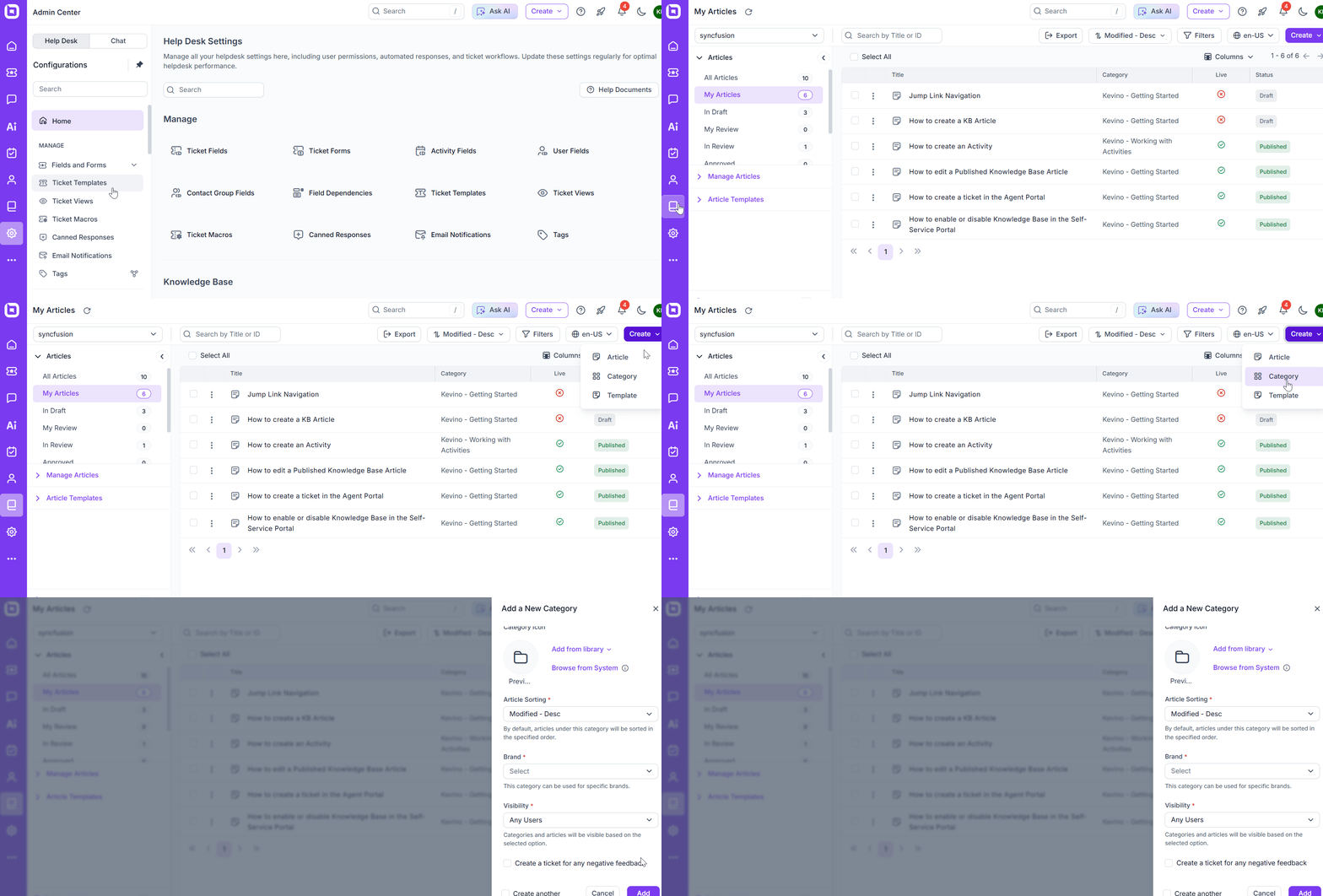
Start by grouping articles into a small number of broad categories, then use subcategories only where necessary.
For example, a software company might organize content under Getting Started, Account Management, Billing, and Troubleshooting.
Using standardized knowledge base article templates can help ensure articles are organized similarly, making it easier for users to find key information regardless of the topic.
3. Use scannable formatting
Once users find the right article, the next step is helping them quickly locate the information they need.
Most users scan articles before they read them in detail. Make content easier to consume with descriptive headings, short paragraphs, bullet points, numbered steps, and highlighted callouts for important information.
Breaking content into logical sections allows users to find relevant information without reading the entire article from top to bottom.
4. Prioritize mobile experience
Content should be easy to access regardless of the device being used.
Many users access help content from mobile devices, especially when troubleshooting products on the go. You need to:
- Use responsive layouts that automatically adjust to different screen sizes.
- Ensure text remains readable without zooming.
- Make buttons and navigation elements easy to tap.
- Test key workflows on mobile devices to confirm users can search, browse categories, and read articles comfortably.
5. Maintain consistent branding
Beyond usability, design also plays an important role in building customer trust and recognition.
Your knowledge base should feel like a natural extension of your website and product experience.
Apply consistent colors, fonts, logos, and styling throughout the help center so users immediately recognize it as an official resource.
Consistent branding builds trust and creates a more seamless experience as customers move between your product, website, and support content.
6. Improve accessibility
Well-designed knowledge base articles should be usable by as many people as possible.
A 2024 AccessibilityChecker.org study of more than 63,000 websites found that 88% were not fully compliant with current web accessibility standards, highlighting the ongoing need for more accessible digital experiences.
Use clear heading structures, sufficient color contrast, descriptive link text, and alternative text for images.
Ensure users can navigate pages using only a keyboard and that content remains readable for people using assistive technologies.
Accessibility improvements often enhance usability for all visitors, not just those with specific accessibility needs.
7. Use visual elements strategically
Finally, consider how visuals can help communicate information more effectively.
Use screenshots, diagrams, annotated images, GIFs, or short videos to illustrate processes and workflows.
For troubleshooting articles, highlight exactly where users should click or what they should expect to see.
Use visuals to clarify information rather than decorate the page. Each image should help users complete a task or better understand a concept.
Reviewing knowledge base examples can also provide inspiration for effective layouts, navigation patterns, and content presentation techniques.
Improve your knowledge base design for better user experiences
An effective knowledge base design helps users navigate content more easily, locate information faster, and consume information with less effort.
By regularly evaluating elements such as search, navigation, accessibility, mobile usability, and visual presentation, you can create a more intuitive and engaging experience for your audience.
The right help desk software can make designing and maintaining user-friendly knowledge base articles significantly easier.
BoldDesk combines customer service software with customizable knowledge base capabilities, enabling teams to create, organize, and refine knowledge base designs that are easy to navigate and maintain as support needs evolve.
Start a 15-day free trial to see how BoldDesk can help your team maintain a user-friendly knowledge base design.
Have questions or a knowledge base design tip that has worked well for your team? Leave a comment below.
Related articles
- How to Create a Knowledge Base in 7 Easy Steps
- How to Create and Manage Your Personal Knowledge Base
- AI Knowledge Base: What It Is and How to Build One