


TL;DR: Chatbot ROI shows whether automation creates more value than it costs. Start by comparing your chatbot’s cost per verified resolution with your current human cost per resolution. Then calculate net savings, break-even volume, and overall ROI while monitoring resolution quality, escalations, repeat contacts, and CSAT.
Organizations invest in chatbots to reduce customer support costs, improve response times, and deliver better customer experiences. While these benefits are achievable, demonstrating their financial impact is often more challenging than implementing the chatbot itself.
According to Gartner, AI is expected to autonomously resolve up to 80% of common customer service issues by 2029 while reducing operational costs by up to 30%.
Whether organizations realize those savings depends on how accurately they measure the performance and business impact of AI agents in customer service.
Many teams rely on metrics such as containment rates, conversation volume, or chatbot usage to demonstrate success. These metrics provide useful operational insights, but they don’t always show whether the chatbot is reducing support costs or delivering return on investment.
As a result, support leaders often struggle to answer a simple question from stakeholders: “What is our chatbot ROI?”
This guide explains how to calculate chatbot ROI, measure the metrics that matter most, and build a reliable ROI model that supports better business decisions.
What is chatbot ROI?
Chatbot ROI (Return on Investment) measures the value a chatbot generates compared to the total cost of implementing, operating, and maintaining it.
A positive ROI indicates that the chatbot creates more value than it costs to run. For customer support teams, ROI is often measured through cost savings, productivity gains, and improvements in customer service performance.
Why businesses measure chatbot ROI
Measuring chatbot ROI helps businesses determine whether their chatbot is delivering measurable business value rather than simply automating conversations.
Tracking AI chatbot ROI enables organizations to:
- Validate the investment: Confirm that the chatbot is generating a positive return through cost savings, productivity gains, or increased revenue.
- Reduce support costs: Measure savings from ticket deflection, lower handling costs, and fewer repetitive inquiries reaching agents.
- Improve customer experience: Track faster response times, higher first-contact resolution, and improved customer satisfaction.
- Increase agent productivity: Quantify time saved by automating routine questions so agents can focus on complex issues.
- Identify optimization opportunities: Use performance data to improve chatbot flows, knowledge sources, and AI responses for better outcomes.
- Support data-driven decisions: Justify future AI investments and prioritize improvements based on measurable business results.
What you need before calculating chatbot ROI
Before calculating chatbot ROI, you need to gather the data needed to measure your chatbot’s financial and operational impact.
Preparing this information upfront helps ensure your AI chatbot ROI calculations are accurate, consistent, and based on measurable business outcomes rather than assumptions.
Define your chatbot’s objectives
Start by deciding what success looks like.
Whether your goal is reducing support costs, improving agent productivity, increasing customer satisfaction, or generating more leads, clear objectives help you identify the outcomes that matter most.
Gather operational data
Collect data on your support team’s performance before implementing the chatbot.
This data will serve as a benchmark that you can compare against after deployment to measure the chatbot’s impact.
Track baseline metrics such as ticket volume, cost per resolution, average handling time, reopen rate, first contact resolution, SLA compliance, and customer satisfaction.
A chatbot conversation should only count as a resolution when the customer’s issue is completed without agent intervention.
Exclude abandoned conversations, unresolved answers, unnecessary escalations, and issues that result in repeated contact within your chosen measurement period.
Calculate your chatbot’s total cost of ownership
Next, account for every cost associated with deploying, operating, and maintaining your chatbot.
Look beyond the subscription fee to include implementation, integrations, AI usage, knowledge base maintenance, training, ongoing optimization, and administration.
Including these costs provides a more accurate picture of your investment and prevents ROI from being overstated.
Identify measurable business benefits
Finally, identify the business outcomes your chatbot delivers that can be measured financially. These benefits form the “total benefits” component of your ROI calculation.
Common benefits include:
- Lower support costs through ticket deflection
- Higher agent productivity
- Faster response and resolution times
- Reduced staffing costs as support volumes grow
- Additional revenue from lead qualification or sales assistance
- Improved customer retention through faster support
Include only benefits you can validate using operational or financial data to ensure your ROI calculation remains accurate and credible.
Chatbot ROI formulas you should know
Once you’ve gathered your data, the following formulas help you estimate your chatbot’s financial impact.
While the overall chatbot ROI formula gives you the final return, you’ll first need to calculate the benefits and costs that feed into it.
Human cost per resolution
Human cost per resolution includes salaries, benefits, help desk software, management, training, and other allocated support costs.
Human cost per resolution = Total human support costs ÷ Issues resolved by agents
Chatbot cost per resolution
The total chatbot cost per resolution should include platform subscription, AI usage, integration, implementation, maintenance, administration, and optimization.
Chatbot cost per resolution = Total chatbot cost of ownership ÷ Verified chatbot resolutions
Savings per resolution
Savings per resolution show the actual amount saved each time the chatbot resolves an issue instead of an agent.
Savings per resolution = Human cost per resolution − Chatbot cost per resolution
Overall chatbot ROI formula
This is the primary formula used to calculate chatbot ROI.
A positive ROI means your chatbot generates more value than it costs to implement and operate.
Use the supporting formulas below to calculate each measurable benefit separately. Together, these values make up the total benefits used in the overall chatbot ROI calculation.
Net support cost savings
Net support cost savings measure how much money your chatbot saves by resolving customer inquiries without human agent involvement.
For customer support teams, this is often one of the largest contributors to chatbot ROI because every successfully automated conversation reduces the cost of handling support requests.
Gross support cost avoided = Verified AI resolutions × Human cost per resolution
Net support cost savings = Gross support cost avoided – Total AI cost
Agent productivity savings
Even when an AI chatbot doesn’t fully resolve an issue, it can still reduce agent workload by collecting customer information, answering common questions, or routing requests automatically.
A McKinsey report estimates that generative AI could improve productivity in customer support by 30–45% of current function costs.
Agent productivity savings measure the value of time your support team gains when the chatbot automates such repetitive tasks.
This formula estimates the value of time agents can redirect to higher-value work.
Revenue gains
Some chatbots do more than resolve customer issues. They also contribute to business growth by generating qualified leads, assisting purchases, reducing cart abandonment, or improving customer retention.
Break-even resolution rate
Before a chatbot delivers a positive return, it must generate enough savings to cover its operating costs.
The break-even resolution rate shows the minimum percentage of support requests the chatbot must resolve independently to reach that point.
A lower break-even deflection rate means your chatbot reaches profitability sooner.
How to calculate chatbot ROI
Now that you’ve estimated your chatbot’s costs and measurable benefits, apply the chatbot ROI formula to calculate your overall return on investment.
Subtract your chatbot’s total costs from its total benefits, divide the result by the total cost, and multiply by 100 to get your ROI.
Example
Suppose your chatbot resolves 5,000 customer issues each month. If the cost per resolution is $12 and the chatbot’s total monthly cost is $18,000, the calculation would be:
Human cost per resolution = Existing support cost ÷ human resolutions = $12.00
Chatbot cost per resolution = $18,000 ÷ 5,000 = $3.60
Savings per resolution = $12.00 − $3.60 = $8.40
Gross human handling cost avoided = 5,000 × $12 = $60,000
Break-even resolution volume = $18,000 ÷ $12 = 1,500 verified resolutions
Net benefit = $60,000 − $18,000 = $42,000
Chatbot ROI = ($42,000 ÷ $18,000) × 100 = 233%
The chatbot costs $3.60 per verified resolution compared with $12 for human-assisted support, reducing the cost per resolution by 70%. At 5,000 automated resolutions, this produces $42,000 in monthly net savings and a 233% ROI.
A 233% ROI means the chatbot generates $2.33 in net return for every $1 invested.
Repeat the same calculation regularly using updated performance data to measure the impact of optimization efforts over time.
Tip: When presenting chatbot ROI to leadership, separate chatbot savings from revenue gains and support your calculations with metrics such as payback period, break-even point, cost per resolution, and CSAT.
Calculate with your own data: Use the BoldDesk AI Chatbot ROI Calculator to compare your current support cost per resolution with projected AI costs and test how the result changes as resolution volume increases.
How resolution volume affects chatbot ROI
Chatbot costs can change as usage increases, particularly when a vendor charges per resolution, outcome, session, or AI credit.
Before projecting ROI, compare AI chatbot pricing for customer service based on the same expected workload so you understand how each billing model affects costs as automation scales.
Calculate projected costs at your current volume and again at two and three times that volume as shown in the table below:
| Input | Current volume | 2× volume | 3× volume |
| Verified AI chatbot resolutions | 5,000 | 10,000 | 15,000 |
| Fixed platform costs | $3,000 | $3,000 | $3,000 |
| AI chatbot usage charges | $15,000 | $30,000 | $45,000 |
| Total AI chatbots cost | $18,000 | $33,000 | $48,000 |
| AI chatbot cost per resolution | $3.60 | $3.30 | $3.20 |
| Savings per resolution | $3.40 | $3.70 | $3.80 |
| Estimated monthly savings | $17,000 | $37,000 | $57,000 |
| Estimated chatbot ROI | 94.4% | 112.1% | 118.8% |
Calculations used:
- Human cost = $7 per ticket
- Savings per resolution = $7.00 − AI cost per resolution
- Monthly savings = Savings per resolution × Resolutions
- ROI = (Monthly savings ÷ Total chatbot cost) × 100
Key chatbot ROI metrics to track
Calculating chatbot ROI provides a snapshot of your chatbot’s financial performance.
The metrics below help explain what’s driving that ROI and where improvements can have the greatest impact.
| Metric | Why it matters |
| Cost per resolution | Shows whether your chatbot is lowering support costs. |
| Total cost of ownership (TCO) | Ensures ROI reflects every operating cost. |
| Deflection rate | Indicates how many issues are resolved without human support. |
| Resolution rate | Shows how often the chatbot successfully resolves customer issues. |
| Customer satisfaction (CSAT) | Confirms automation maintains a positive customer experience. |
| Fallback rate | Highlights knowledge gaps that reduce chatbot effectiveness. |
| Escalation rate | Shows how often conversations still require an agent. |
| Chatbot conversion rate | Measures the chatbot’s contribution to revenue. |
No single metric tells the full story. Review these chatbot metrics together to understand whether your chatbot is reducing costs while maintaining a positive customer experience.
Key takeaway: Strong chatbot ROI comes from lowering support costs, resolving more customer issues, and maintaining high customer satisfaction over time.
What does good chatbot ROI look like?
There isn’t a universal benchmark for chatbot ROI because results vary depending on your support volume, operating costs, business goals, and the types of customer inquiries being automated.
Instead of targeting a specific ROI percentage, evaluate whether your chatbot is delivering measurable improvements over your previous support process.
A chatbot generally creates a strong ROI when it consistently:
- Reduces the cost per resolution
- Resolves more customer issues without agent involvement
- Improves customer satisfaction
- Reduces repeat contacts and escalations
- Frees agents to focus on higher-value work
These outcomes indicate that your chatbot is creating real business value rather than simply increasing automation or conversation volume.
Remember that a high ROI isn’t meaningful if it comes at the expense of the customer experience. Sustainable ROI improves operational efficiency while maintaining high customer service standards.
Common mistakes that overstate chatbot ROI
Even a well-designed ROI model can produce misleading results if it’s based on unrealistic assumptions. Avoid these common mistakes to keep your chatbot ROI calculations accurate and credible.
- Counting every conversation as a cost saving: Not every chatbot interaction replaces human work. Only include conversations that are fully resolved without agent involvement or those that deliver measurable time savings.
- Ignoring escalation costs: Conversations transferred to agents still consume time and resources. If escalations are frequent, your chatbot may be reducing less work than expected.
- Leaving out ongoing operating costs: Maintenance, AI usage, knowledge base updates, and optimization all contribute to the total cost of ownership. Excluding these costs can significantly overstate ROI.
- Overestimating revenue impact: Not every chatbot-assisted conversion or lead is additional revenue. Attribute revenue only when you can demonstrate that the chatbot directly influenced the outcome.
- Focusing on activity instead of outcomes: High conversation volume or containment rates don’t necessarily indicate success. A chatbot creates meaningful ROI when it resolves customer issues, cuts support costs, and maintains a positive customer experience.
If chatbot usage continues to increase but support costs, repeat contacts, or escalations remain unchanged, it’s a good sign that your ROI assumptions need to be reviewed.
Practical ways to improve chatbot ROI over time
Improving chatbot ROI is an ongoing process. As customer needs, support volumes, and business priorities change, regularly optimizing your chatbot helps reduce costs, improve customer experiences, and maximize long-term business value.
- Focus on high-volume use cases: Automate repetitive requests such as FAQs, order tracking, billing inquiries, and password resets first. These interactions are easier to automate and typically deliver the fastest ROI because they consume a large share of agent time.
- Keep your knowledge base up to date: Your chatbot can only provide accurate answers if the underlying content is current. Regularly updating help articles and product documentation reduces fallback responses and improves resolution rates.
- Use the chatbot throughout the support journey: Measure how the chatbot contributes across the entire customer journey. Even when conversations require an agent, collecting customer information and routing requests correctly can reduce handling time and improve resolution quality.
- Optimize escalation workflows: When a chatbot can’t confidently resolve an issue, transfer the conversation to the right agent with the full chat history and customer context. This reduces duplicate work and shortens resolution times.
- Balance automation with human support: Use chatbots for repetitive requests while routing complex or sensitive conversations to human agents. Applying automation where it delivers the greatest value improves both ROI and customer satisfaction.
- Review performance regularly: Monitor fallback rates, repeat contacts, failed conversations, and low-confidence responses to identify improvement opportunities.
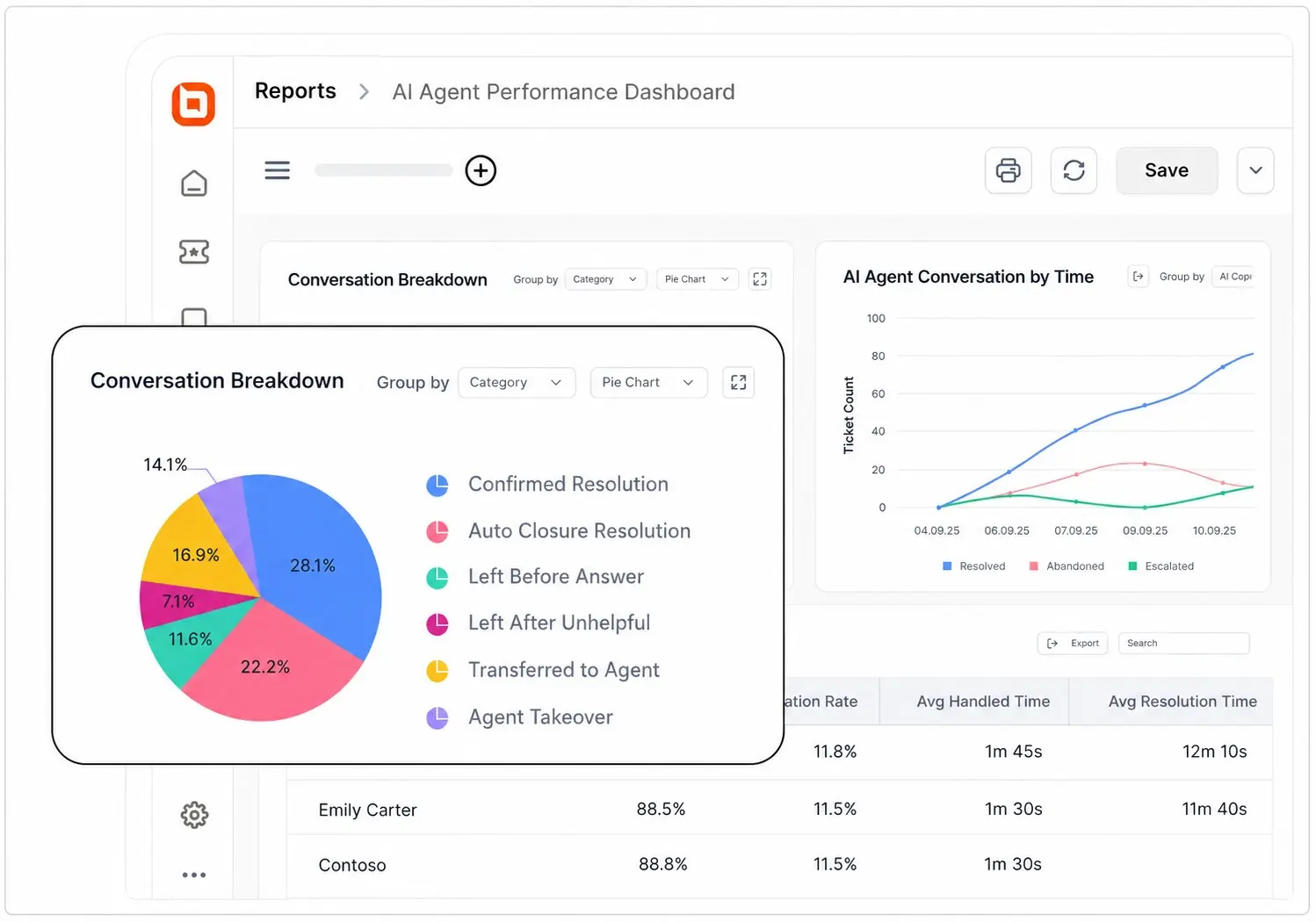
Key takeaway: Prioritize the conversations your chatbot handles most often. Small improvements to high-volume interactions typically deliver the greatest ROI.
Turn chatbot ROI insights into action
Measuring chatbot ROI is only the first step. The real value comes from using those insights to continuously improve support operations and customer outcomes.
BoldDesk helps support teams maximize those outcomes with AI Agents that automate up to 70% of recurring conversations, built-in AI performance insights, and intelligent workflows that simplify support operations.
Ready to prove and improve your support ROI? Start a free trial to see how BoldDesk can help you automate support, reduce operational costs, and deliver better customer experiences.
How do you measure chatbot ROI in your organization? Share the metrics, benchmarks, or challenges that have helped shape your approach.
Related articles
- Customer Service ROI: Effective Tips to Measure and Improve It
- Customer Acquisition Cost: How to Calculate & Cut It [2026]
- Top Customer Experience Metrics to Measure and Improve CX in 2026
FAQs on Chatbot ROI
Containment measures the percentage of customer conversations that a chatbot resolves without human assistance. Deflection measures the number of support requests avoided because customers found answers through a chatbot or other self-service resources before contacting support.
Most organizations begin seeing measurable value within the first few months, but timelines vary based on support volume, knowledge base quality, automation coverage, and optimization efforts.
Higher-volume support teams often reach positive ROI faster because they have more opportunities to automate repetitive requests.
Common reasons include unrealistic assumptions about automation rates, poor chatbot accuracy, and low customer adoption. ROI can also be overstated when businesses ignore ongoing costs, human escalations, and the impact on customer satisfaction and resolution quality.
Yes. Chatbot ROI measures the value created by chatbot automation, while help desk ROI measures the overall performance and cost efficiency of your support operation. Tracking both separately provides a clearer view of business impact.
Present chatbot ROI by comparing support performance before and after implementation. Show measurable chatbot cost savings, productivity improvements, customer experience metrics, and revenue impact separately.
Including your payback period and break-even point also helps demonstrate the chatbot’s overall business value.